반응형
1. homebrew 설치
- site 에서 다운로드
Homebrew
The Missing Package Manager for macOS (or Linux).
brew.sh
- terminal 로 다운로드
/bin/bash -c "$(curl -fsSL https://raw.githubusercontent.com/Homebrew/install/HEAD/install.sh)"
2. Homebrew 에서 git 설치
brew install git
3. git config 내 계정연결
git config --list
git config --global user.name "XXX"
git config --global user.email "XXX@AAA.com"
4. github 에 ssh 설정(public key 인증)
ssh-keygen
public key 확인
ls ~/.sshcat ~/.ssh/id_rsa.pub
만약 윗 명령어로 찾을 수 없을 시
cat ~/.ssh/id_ed25519.pub
바로 복사해서 사용 시(추천)
pbcopy < ~/.ssh/id_ed25519.pub
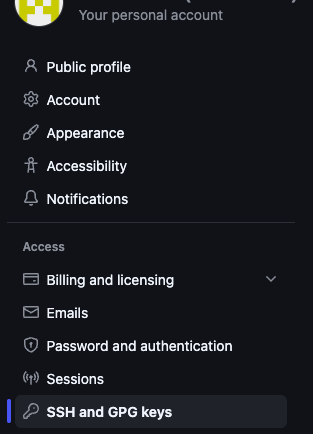
생성된 ssh public key 를 github setting 내 SSH and GPG keys 내 등록
5. 최종확인
ssh -T git@github.com
: Hi ~~~ You've successfully authenticated ~~~ 나오면 성공!
반응형
'Setting' 카테고리의 다른 글
| UnsupportedClassVersionError ( java 설치 for mac os) (0) | 2026.02.04 |
|---|---|
| Claude code init setting (0) | 2026.01.25 |